Showing posts with label Interesting Website. Show all posts
Wednesday, October 13, 2010

New Version of Twitter

Oh No~!!! Its been quite long I din update my blog adi.. Almost 1/2 months never touch my blogger.. >.< Feel lazy currently.. I'm a lazy pig.. Lolx

Old Version

Anyway, I would like to share something interesting with you all.. Currently, I log into my Twitter, I realized dat a new version of Twitter is available for trial..

Then I feel curious about how it is look like, so I straight away click the button of "Try it now!".. Juz wif a simple click and it turns my old version of Twitter to a new version.. Lolx..

New Version


Saturday, August 7, 2010

Photoscape

While I was chatting wif my fren in MSN yesterday, she suddenly showed me a photo dat had been edited nicely wif cute icons.. I'm wondering how she did it and asked her about it.. Then she shared dis nice software, Photoscape wif me.. Juz take a few simple steps to get dis software..


First of all, juz download and install the software into ur pc.. :D

After finished install the software, juz simply click on the "Photoscape" and u can start using the software freely wif many of the nice functions..

Here are some of my trial of editing photos by using dis software.. :D


Thursday, July 29, 2010

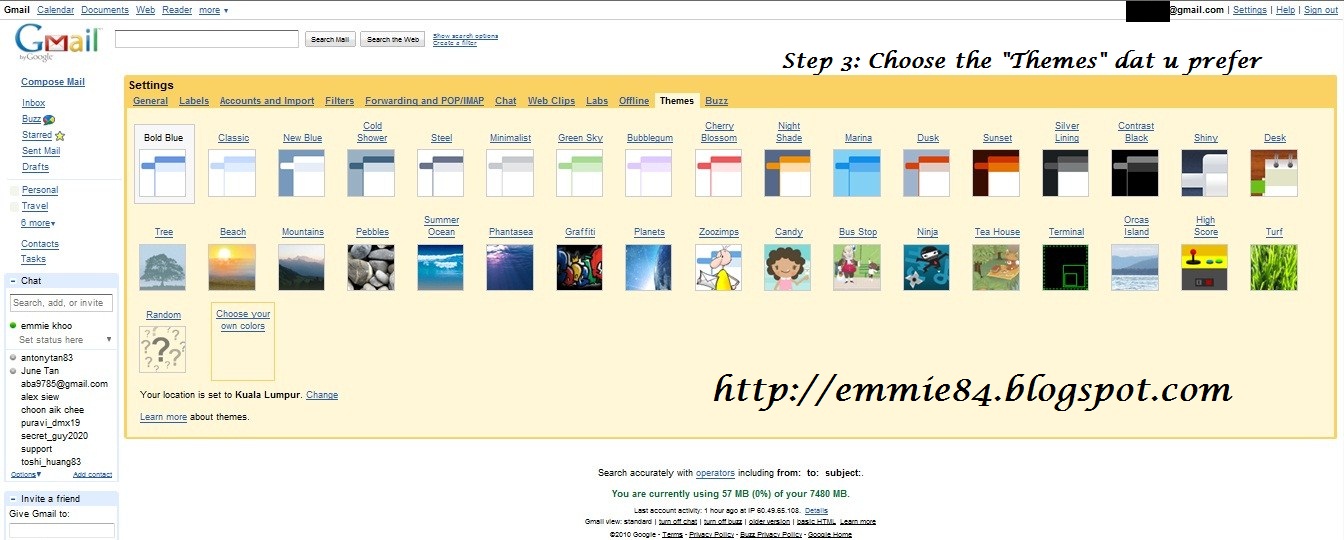
Gmail Nice Fuction

I get to know about dis interesting Gmail Theme from a fren of mine.. She told me dat Gmail got nice and colourful theme so dat we are not bored wif the previous dull theme.. So I'm starting curious about it.. and wanna to find it wat is the function dat my fren talking about..

Once I finished up my work, then I fast fast log in to my Gmail account.. and start trying out the nice function.. :D

Below are some of the print screen dat I captured during I'm playing around wif the function.. :D


Saturday, April 24, 2010

My Blog Is Neutral Carbon

I came across to this interesting website, called Machs Grun! Gemeinsam 1 Million Baume retten from a fren of mine.. WHY I support "My Blog Is Neutral Carbon"? Here is the reason.. xD

Being part of the initiative “My blog is carbon neutral” is an active contribution to help the environment! All you have to do is described here. Make it happen - make it green!

1 Tree for 1 Blog


This initiative programme was originally started in Germany by the "Make it Green" programme, that has the goal to reduce carbon dioxide emissions. We plant a tree for your blog and thereby neutralise your blog’s carbon footprint for the next 50 years! Everyone can make a small contribution to the environment. Every tree counts!

So wat r u waiting for?? Faster take an action and join it now to plant a tree in your blog~!

Here's how you can participate!

Just write a short blog post about our programme “My blog is carbon neutral” and include one of the buttons below on your site (ideally in the sidebar). Send the link to your blog to CO2-neutral@kaufda.de and we plant a tree for you, neutralising the carbon dioxide emissions of your blog. The trees will be planted in the spring of 2010 by the Arbor Day Foundation. For more information about how and where the trees are planted, see the NEWS section.

Just a few easy steps to make it green:
1. Write a blog post about the initiative + insert your favourite button
2. E-mail the link to your post to CO2-neutral@kaufda.de
3. We plant a tree for your blog in Plumas’!

carbon neutral coupons with kaufDA.de


Friday, March 26, 2010

Funny Photo Widget

Yesterday when I viewed my fren's Facebook profile, then I saw some photo dat she posted.. Wow~! really cute n nice.. Then I clicked into her photo album and saw dat those photo was uploaded via Funny Photo Widget..

I'm feel curious about it and try to click on the link of "Funny Photo Widget" and another webpage is coming out.. and I found out dat this Funny Photo Widget is one of the Facebook application.. ^^ Then I click into the application and tried out some of the cute and nice photo..

And here is the result dat I get.. Dang dang...~!


Wednesday, March 3, 2010

Fring Software

Since I bought my new bao bei, the only software dat I installed is Garmin.. Now I get to know another software called Fring through my fren's blog.. So I go into the website n download the software..

After I downloaded the software, I tried on it.. Oh no~! It's charging me.. It deduct my credit.. >.< Coz as I read in her blog, she said dat "FREE chatting without using any credits.." Besides dat, she oso said dat "Free talk, live chat & interact. You can connect with all your mobile friends. It's free." Then I feel curious about it n ask her.. She said if use the Maxis Broadband, then it will charge for the usage.. but if take it to McD or Starbuck, using the free WIFI.. then it's free.. Juz like taking own laptop to McD and online.. ^^

Fring mobile download


Monday, February 8, 2010

PureFren.Net (Beta Version)

I've been joining dis community website since I was in college.. If i'm not mistaken, I had joined for almost 6 or 7 yrs.. not so sure about it.. The website was very happening last time.. Quite many ppl logged into it to chit-chatting, have some discussion, exchanging ideas or give some opinions in the discussion forum..

but dis few yrs, getting less n less ppl logged into the website.. n now dis website is going to be closed soon n will be moved to a new website, so called Purefren.Net (Beta Version).


Old Site - PureFren.Net


New Site - PureFren.Net (Beta Version)

All are welcome to join.. Wat u have to do is juz register ur username n password then will do.. ^^


Friday, October 23, 2009

My Live Signature

I was reading a blog belongs to 1 of my fren.. When I'm almost to the end of the blog, i suddenly saw a signature on her blog.. Hmm, really wondering how she put it in.. So I click on her signature n came out another page called "My Live Signature".. Dis interesting website is let you to create your signature.. xD

There got 3 methods to create the signature.. The 1st method is to use the signature creation wizard.. Wat u need to do is to enter your name of the signature, select the handwriting that suits you from the offered list, specify the size, color and slope of the signature and it will be ready!

The 2nd method is draw your own personal signature.. U juz need to use your mouse or pen to hand make your own personal signature straight on your screen.. And the last method is using a scanned image.. If you need to get an exact copy of your signature, u need to write down your signature on a piece of paper, scan it and send to "My Live Signature".. Their designers will process the image in a short period of time and use it to create a signature for you.. If you choose dis method, u need to pay for the charges..

Without thinking much, I try to create a signature for myself ^^ I choosed the 1st method n here are the steps of creating my signature.. xD

Step 1: Enter the name


Step 2: Select the font

Step 3: Select the size


Step 4: Select the colour


Step 5: Select the slope

Step 6: Name the signature

Here is the signature dat i created


For more information, please click the link below n lets try to create 1 signature for your own ^^

http://www.mylivesignature.com/index.php

Tuesday, June 2, 2009

Blazing Radio

Blazing Radio uses a seperate dynamic files to stream servers in a 'blazing' speed and can be recorded too...


Why to use Blazing Radio?

•It's easy to use
•It has a huge database of radio stations
•It has a nice visualization
•You can easily record what you're listening to
•You can hide it in the system tray
•You can play back on multiple soundcards
•Can adjust sound with 9 band equalizer
•Get updates fully through the program without downloading any
•.. and it's free!

Supported Stream Types

•Shoutcast and Icecast MP3 Streaming
•Icecast OGG Vorbis Streaming
•WMA Streaming
•AAC Streaming
•AC3 Streaming

Recording Features
•Recording buffer: Record What you hear
•Or record the whole song if the playlist changes automatically
•Direct MP3 Audio stream saving, no loss of quality!
•Direct OGG Vorbis stream saving, no loss of quality!
•Or encode OGG Vorbis as MP3 using Lame
•Encode WMA or AAC to MP3 using Lame

Download Links:
http://blazingradio.co.cc/setup.zip
Related Posts with Thumbnails
 
Emmie's E-Diary@2012 . Template Design By: SkinCorner